Writing
Sharing a boulder without a backend: files and previews on iOS
How Boulder Log shares climbs through messaging apps using a portable ZIP format, a custom iOS document type and a Quick Look preview extension.
On this page
A friend sends you a boulder. You open the attachment, see the climb and its marked holds, then add it to your own log.
Messages, email, WhatsApp or AirDrop can carry it. You can use whatever you already use to chat with your bouldering buddies.
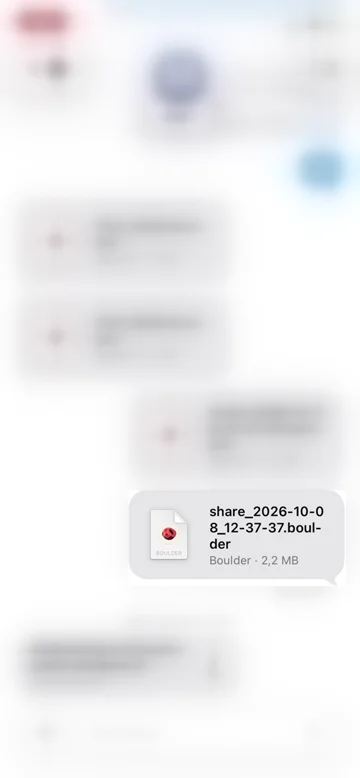
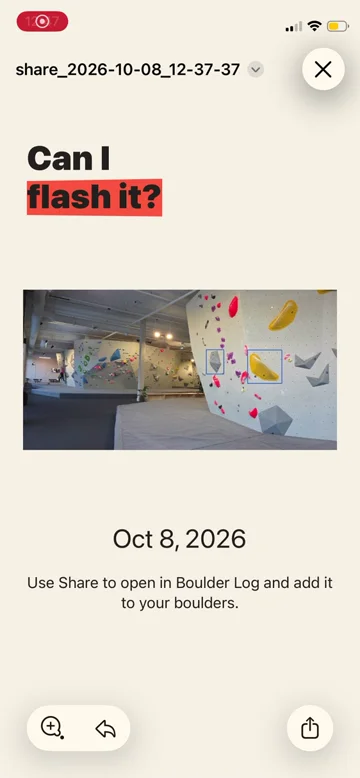
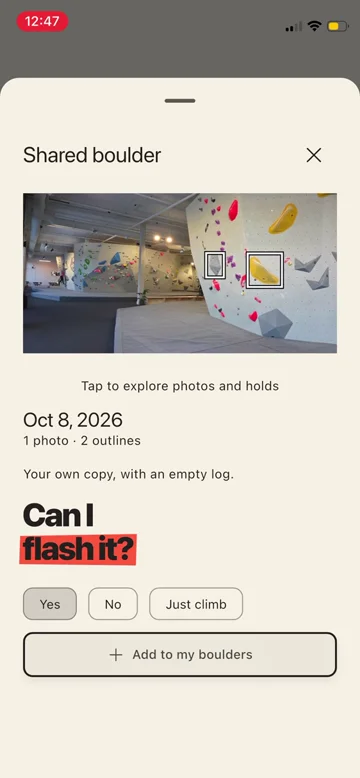
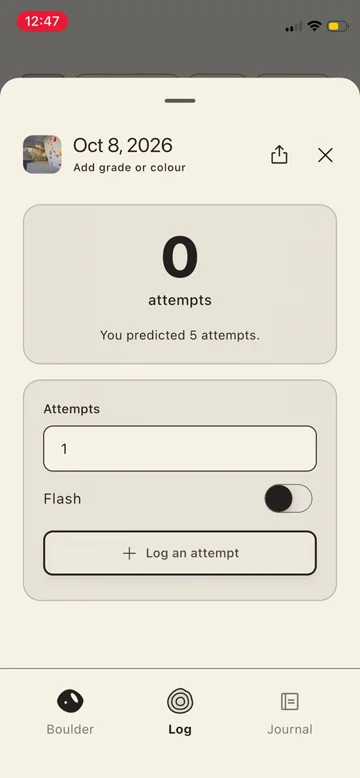
Watch the full sharing and import flow (16 seconds).
Welcome to Boulder Log.
You can download the same boulder and try it yourself.
The four steps above also give us a way to look inside the implementation.
Receive
What arrives in the conversation is a .boulder attachment. It contains the climb’s photos, marked holds and details.
Underneath the extension, it’s a ZIP. You can inspect the file from the video with unzip -l:
  Length  Name
--------  -----
  136333  preview.jpg
    1681  manifest.json
    7327  openapi.yaml
 1017357  assets/fe713087-ee95-45a2-a637-4bc552d8ad3f.png
 1017357  assets/f66f84d2-b06b-4a50-ade8-d08b35094152.png
--------
 2180055  5 files
manifest.json describes the boulder and connects its records to the image assets. The hold outlines are geometry: points on the photo, rather than separate pictures of each hold. The bundled openapi.yaml describes the format used for this export. Someone inspecting the file has both the data and its contract available.
The extra image, preview.jpg, is there for the person opening the attachment. We could draw the photo and its outlines again in the preview extension, but preparing that image during export makes the receiving side simpler. Dart renders the main photo with the active outlines once, and the file carries the result.
It’s a small presentation copy, limited to 1,200 pixels on its longest edge and at most 2 MiB. In this particular file it’s about 133 KiB. The full image assets and outline geometry remain available for exploring the climb inside the app. A boulder without a photo omits the preview image.
Preview
Connecting a custom document type to Quick Look
I was new to this part of iOS. My first questions were about whether we could “register” for .boulder, so a file received through Messages, WhatsApp or email could find its way into the app.
There are two connections to make: tell iOS what the document type is and which app can open it, then provide a preview extension for that type.
Boulder Log declares net.learnalist.boulder through UTExportedTypeDeclarations in Info.plist. These excerpts associate the identifier with the extension and MIME type:
<key>UTTypeIdentifier</key>
<string>net.learnalist.boulder</string>
<key>UTTypeTagSpecification</key>
<dict>
  <key>public.filename-extension</key>
  <array>
    <string>boulder</string>
  </array>
  <key>public.mime-type</key>
  <string>application/vnd.learnalist.boulder</string>
</dict>
The app’s CFBundleDocumentTypes entry lists that identifier under LSItemContentTypes. The Quick Look extension names it too:
<key>QLSupportedContentTypes</key>
<array>
  <string>net.learnalist.boulder</string>
</array>
Its view controller implements QLPreviewingController. iOS passes the attachment’s URL to this method:
func preparePreviewOfFile(
  at url: URL,
  completionHandler handler: @escaping (Error?) -> Void
)
Our reader walks the ZIP directory and reads the manifest and optional preview image. The archive uses stored, uncompressed entries, so it can seek to those members without extracting all the photos. It checks paths, sizes and checksums along the way. Previewing doesn’t import any climbing records.
The JPEG supplies the photo and marked holds. Swift supplies the surrounding headline, boulder name, grade and opening instruction. That means the native extension doesn’t need to run Flutter, while the text stays accessible and supports Dynamic Type. The system owns the Open and Share controls around our content.

Getting that working gave us room to iterate on the presentation: what the eye goes to first, how much text is needed, and how to help someone continue into the app.
A preview that compiled but didn’t appear
One failure was particularly confusing. The extension compiled, but the phone kept showing a generic file screen.
The extension was starting and then crashing. Despite the Swift import, Quick Look wasn’t retained in the linked binary. The host couldn’t resolve QLPreviewExtensionServiceContext_iOS, and iOS silently fell back to its ordinary file view.
Explicitly retaining the framework fixed this target:
-Wl,-needed_framework,QuickLook
We checked the binary with otool -L and tested through a real Quick Look host. The ZIP-reader tests and a successful build hadn’t exercised that startup path.
Physical-device testing mattered for the handoff too. In Messages, WhatsApp and Gmail, we confirmed the route through the system preview, then Share → Boulder Log. AirDrop also offered Boulder Log. Each receiving app has its own attachment interface, so declaring the type doesn’t make every tap behave identically.
Seeing the custom preview finally appear through WhatsApp was a satisfying moment. The work inside the app was now reaching the conversation where the file arrived.
Import
By the time someone chooses Boulder Log from the share sheet, they’ve seen the climb. Now the app needs to establish that it understands the file well enough to import it.
The manifest identifies the format and version:
{
  "format": "boulder-log-archive",
  "version": 1,
  "kind": "boulder"
}
Those are fields from the manifest, not the whole document. The current reader accepts the supported format and version, checks that this is a single boulder, and validates the records and assets. An unsupported version is rejected rather than interpreted as if it were a familiar one.
The OpenAPI file has a specific role here. It describes what was exported, but it doesn’t get to define what the receiving app will accept. The app validates against its own compiled contract, generated from the project’s OpenAPI specification. It doesn’t load validation rules from the incoming archive or fetch external schema references.
That distinction lets us include the contract with the data without asking the app to trust instructions supplied by the file it’s checking.
Validation also goes beyond record shapes. Referenced photos and outlines must belong together, image files must be valid, and archive paths must be safe. Only then does the app offer the boulder for import.
The import sheet shows the photo and holds and lets the recipient make their own prediction. In the video, I predict five attempts, then tap “Add to my boulders”. The app creates local records and copies the assets into its own storage.
Your log
The original idea was to receive someone else’s climb without inheriting their attempts. Sharing leaves personal history out by default; even when the sender includes it, it doesn’t become the recipient’s log.
The video ends with zero attempts and my prediction of five. That’s where the sharing flow hands over to climbing.
Each person has their own copy. Changes don’t synchronise, and receiving the same shared origin again opens the existing boulder without overwriting personal edits.
I like how little needs to happen between a conversation about a climb and having it ready to try. Send the file through the conversation you’re already having, preview it, add it. Seeing that work felt a little magical.
Try it with a boulder
Install Boulder Log from the App Store, then download the boulder shown in the video (about 2.1 MB).
Open it on your iPhone, look at the preview, then use Share → Boulder Log to add it to your own log.
A file you can keep
Obsidian makes a good case for keeping notes in Markdown: you can open them with other tools, and they remain useful if you stop using the app. Its “Free your notes” post puts that independence at the centre of making data last.
That appeals to me here too. A boulder has more pieces than a note, but ZIP gives those pieces somewhere familiar to live. You can unpack the file, look at the photos, read the JSON and find the contract that describes it. Understanding the data doesn’t have to begin with reverse-engineering Boulder Log.
SQLite is another container I’d happily consider for this sort of thing: structured data in a file you can inspect with existing tools. For this sharing format, ZIP fits neatly because the images and text files can travel together as they are.
Choosing a familiar container doesn’t do all the work of keeping a format useful. The records still need to be documented, and versions need care. But it gives the contents a life outside the interface that created them. You can keep a boulder, send it later, or build something else that reads it.
Boulder Log may have a backend one day. There are features that could benefit from one. Sharing a boulder will always work without it.